
1
Take Screenshots of Character Select screen for each account(showing all 3 slots the screen after you login). This will be needed during step 3.
If you get an error while applying it’s likely your screenshot file size is too large, try saving in jpg or another format.
https://www.take-a-screenshot.org/windows.html for how to take a screenshot if you’re unsure how to.
2
Login and Add Characters.
- Navigate to: ASCEE Auth.
- Select “Log In with EVE Online”.
- Sign in using the same login credentials you use for secure.eveonline.com.
- Select your “main” character and click “Authorize”. Logout from above link to switch eve accounts.
- Click “Register”
- Click ‘Authorize Characters’ on the dashboard to Add your characters. Red Button. Or the Add Character button inside of Character Audit.

3
Add Characters to Character Audit
- Link EVERY character you have via the following process:
- Go to Character Audit found under Human Resources and click the Add Character Button at top.(only required if you’re not using the red button on main page, This button does the same thing.) Stay logged into your main so the characters remain linked.

Log in with your account then click the portrait, followed by ‘Authorize’. Select a different character to add it, to switch accounts logout of the eveonline portion of the process and use the SSO to login to your next account, but do not logout of ascee auth.
(There will be a butt-load of scopes requested, this is so we can process your application. and does not give us control over your characters or account)
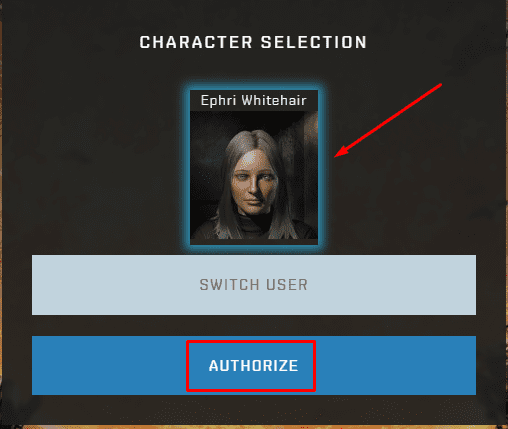
Continue this process until all characters are added to the character audit tool.
NOTE: If you have authed in many places in the past, it might be worth periodically checking out which applications have access to your ESI. You can do this in the EvE Online Third Party Applications Portal. Go through the list of authorized applications and remove whatever you don’t recognize. In your case, you should be authorized to at least ASCEE Auth and if you’re already in the Imperium, GoonAuth as well.
4
Submitting the Application
Visit https://auth.ascee.net and fill out the Application found under the menu Human Resources
Take your time and fill it out correctly and honestly. Be sure to list all alts even unused or inactive ones. You application may be rejected if you try to hide characters
5
Join in-game channel ‘Ascendance Recruitment’ and wait for a recruiter to contact you
You can ask to speak to a recruiter if one doesn’t contact you. Make sure when online to be in channel so they can interview you. They will try to catch you for 1 week, if they haven’t after that, the application will be rejected.
Most apps are reviewed in under 24-48 hours except if Goonswarm is deployed or at war, then times can take longer..
How to Join an In Game Channel (IGC)
Either click on the chat icon in the menu bar, or you can open the menu, go to social, then open chat channels. Enter the name of the channel you want to join in the text box then click join